
St. BernadineCompassion. Competence. Commitment.

ST. BERNADINE / UPDATE REPORTS

Progress you
can follow.

A clear record of what’s new, what’s improved and what comes next for the St. Bernadine website.

Read the latest update

Latest report · November 19, 2026

Healthcare professional wearing blue scrubs and a stethoscope
PEOPLE HELPING PEOPLE

A better experience.
One update at a time.

Google reviews on the website

8 existing reviews · Direct review link

Showing all 11 reports · Newest first

Google reviews and visitor feedback invitationA direct Google review button, an optional homepage invitation and a dated display of the eight existing Google reviews.Released · temporary review display
Full update report

A direct way to share feedback

Visitors can now use “Write a Google Review” from the homepage reviews section, or “Review Us on Google” in the shared page footers. These links open the verified St. Bernadine USA Google review page. Visitors choose their stars and write their own comments on Google; posting and moderation are handled by Google, and a Google account is required.

An optional review invitation

A dismissible homepage invitation asks visitors about their St. Bernadine experience. It becomes eligible after at least one minute and after the visitor has browsed at least 35% of the page. It waits while a cookie-choice banner, menu, chat or another dialog is open, or while someone is interacting with a form. It does not automatically appear on form pages. All honest feedback is welcome; the invitation does not screen visitors by their rating.

Existing Google feedback is now visible

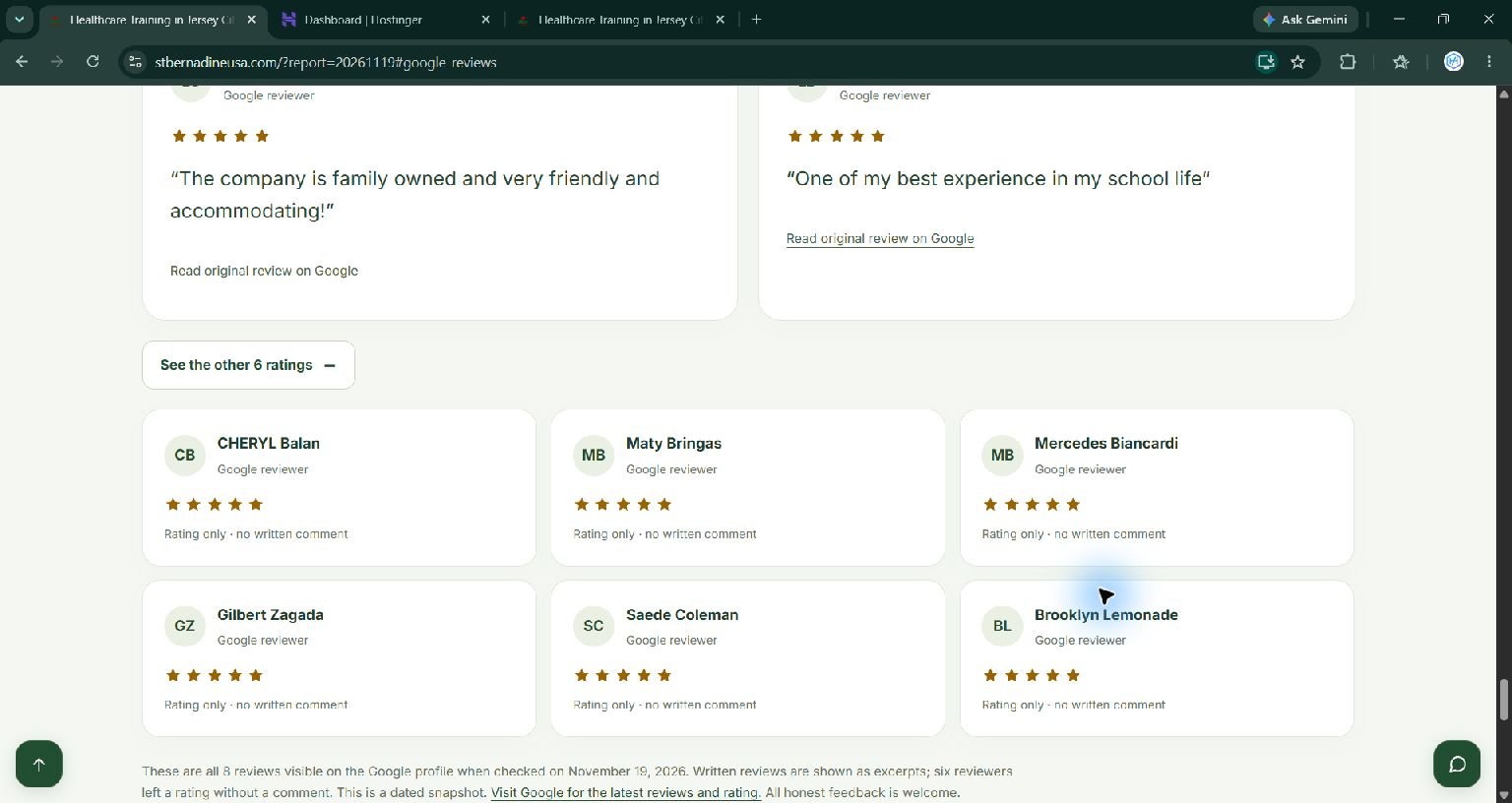
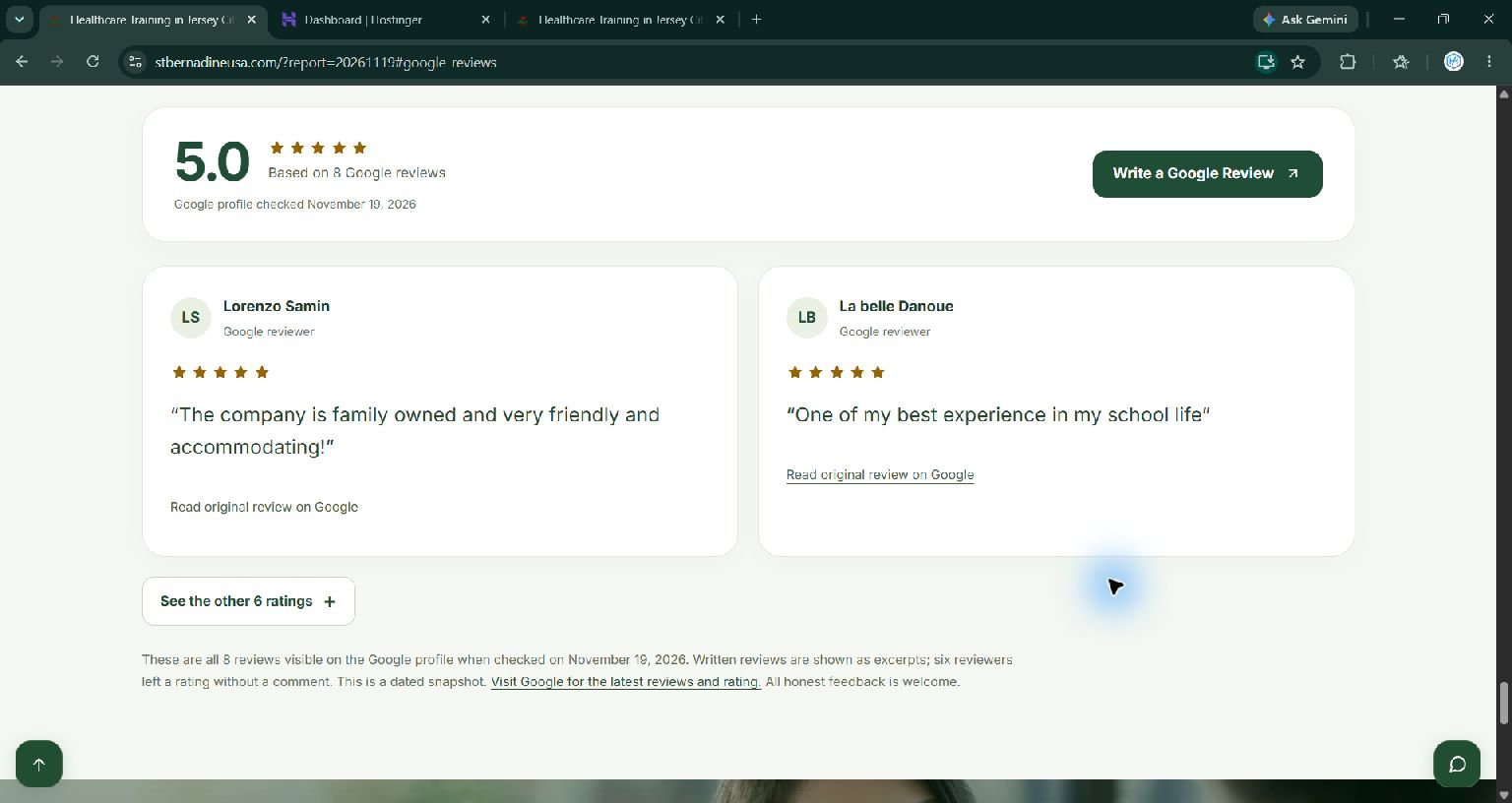
The Google profile checked on November 19, 2026 showed a 5.0 rating from eight reviews. All eight existing reviews are represented on the website: two written-review excerpts and six rating-only entries. Author links and links back to Google identify the source. The rating and reviews existed before this website update; they are not new reviews generated by this release.

Temporary display and future refresh

The current website display is a dated snapshot, as requested. It is not an automatic Google reviews feed. New or edited reviews may appear on Google before they appear on this website. Visitors can always follow the Google links for the latest information. Automatic synchronization can be connected in a later update when the required Google Business Profile access is available.

Remembering the visitor’s choice

Closing the invitation hides repeat invitations in that browser for seven days. Opening the Google review link hides them for ninety days. Only the format version and an expiry date are stored locally; no contact information or visitor tracking identifier is collected for this feature. The privacy page explains this behavior. Blocked browser storage does not prevent the website from working.

Release checks and practical scope

The website release passed all 79 automated checks, covering existing form, security, privacy, email and SEO behavior as well as the new invitation rules. Live checks matched all 36 sitemap pages and both new review assets to the released source. Browser checks covered the desktop section, expanded ratings, the invitation at desktop and narrow-window widths, and dismissal behavior. These are browser checks, not physical-device certification. No test review was posted to Google.

Live website screenshots

Captured from the released St. Bernadine website on November 19, 2026.
Google review summary and written feedback
Google review summary and written feedback. The live homepage shows the 5.0 rating, the eight-review count, two comment excerpts and direct Google review links. Select the image to open the full-size screenshot.
Expanded rating-only reviews
Expanded rating-only reviews. The expandable section shows the other six Google ratings without adding comments that those reviewers did not write. Select the image to open the full-size screenshot.

This report records the work and checks for this release. The Google rating shown is a dated observation, not a live rating monitor.

Connected to Google Search ConsoleVerified ownership, a successfully processed 35-page sitemap, four accepted crawl requests and a search-performance baseline.Setup complete · Google processing pending
Full update report

Google Search Console setup completed

The St. Bernadine website is now verified in Google Search Console. This service provides reports directly from Google about how people find the website and whether its pages can appear in search. Verification used the existing HTML verification file; that file remains in place to preserve ownership verification.

Current sitemap successfully processed

The current sitemap at https://stbernadineusa.com/sitemap.xml was submitted, and Google reported “Sitemap processed successfully” on November 18. Google discovered all 35 pages listed in this sitemap. Discovery means Google knows these addresses; it does not mean all 35 pages are already indexed or guaranteed to appear in search results.

Four priority pages submitted for a fresh crawl

Fresh indexing requests were accepted for the homepage, Placement, Home Care and CNA Program pages. The homepage is already indexed. The other three inspection records still showed older preferred addresses ending in .html and using www, based on crawls before the November 17 SEO update. Their preferred addresses were corrected in that release. Google accepted all four requests into its priority crawl queue and must now revisit and process the pages.

Search performance baseline recorded

The three-month Web search report, covering August 16 through November 15, 2026, showed 215 clicks, 2.25K impressions, a 9.6% average click-through rate and an average position of 7.5. Impressions count appearances in search results; clicks count visits from those results. Average position summarizes the positions recorded across searches and is not a fixed ranking for one keyword. These figures predate the November 17 release and serve as a baseline for later comparisons, rather than results attributed to the new update.

Historical indexing records reviewed

The indexing report last updated on November 13 showed 5 indexed and 87 not-indexed URLs across all known pages. That total includes older and duplicate addresses, redirects and previous errors. It is not a report of 87 failures among the 35 current sitemap pages. The older records need to be assessed as Google processes the updated website.

Historical server-error validation started

Google’s historical server-error record referred to /apply-job.html, last crawled on October 22. The current address redirects to /apply-job and returns HTTP 200 successfully. A validation request was started on November 18, and Google displayed “Validation started.” This validation remains pending; it has not yet been marked passed by Google.

What this update makes possible

The website now has a verified reporting channel for measuring search visibility and checking indexing problems. The submitted sitemap and individual crawl requests help Google discover and reassess the updated pages. Future comparisons can use clicks, impressions, search terms and page coverage to identify useful improvements. Search rankings, indexing decisions and processing times remain controlled by Google.

Completed work and next checkpoint

Completed today: ownership verification, successful submission of the 35-page sitemap, four accepted crawl requests, a recorded performance baseline and a validation request for the historical server error. Google’s recrawling and validation are still in progress. The next checkpoint is to review those results after processing. No website code was changed as part of today’s Search Console setup.

This report describes the work and checks recorded for this release. Historical results are not a live service-status monitor.

Clearer search information across the websitePage-specific titles, descriptions, preferred addresses, structured data and a refreshed sitemap across 35 public pages.Released
Full update report

New SEO update released

The SEO update is now live across all 35 public pages of stbernadineusa.com. This release improves how the website describes its programs, services and resources to search engines, and makes the preferred page addresses consistent throughout the site.

Clearer search titles and descriptions

Every public page now has its own title and description, including pages that previously lacked a description. Program pages identify the relevant training and Jersey City or New Jersey location where appropriate. Placement, home care, inquiries and student resources use wording specific to their content. This helps visitors understand which page answers their needs when they see it in search results; search engines may choose their own displayed title or snippet.

Consistent page addresses and redirects

The preferred website address is https://stbernadineusa.com. Canonical tags—the page’s preferred address for search engines—now match the website’s clean URLs. Internal page links use those destinations directly. Old .html links, duplicate index addresses and supported case or trailing-slash variants permanently redirect to the correct page. Inquiry category parameters are preserved during these redirects.

Updated sitemap and crawler settings

The sitemap now lists all 35 public pages using their direct, preferred addresses, with the November 17 update date. It is published at stbernadineusa.com/sitemap.xml and referenced in robots.txt. Public pages and their assets remain available for crawling, while crawler instructions exclude the API and health-check paths. These instructions guide search engines; existing access controls continue to protect server files.

Accurate business and course information

Structured data is the machine-readable information that helps search engines understand a website. The organization name, Jersey City address, phone number and website identity are now consistent across the pages. Existing course information has been aligned with the correct page and provider. Registration fees are no longer presented in this markup as prices for an entire course.

Sharing previews and a broken link corrected

Page titles, descriptions, preferred addresses and the St. Bernadine logo are also aligned in the metadata used for social sharing previews. The broken application PDF download link now directs visitors to request a printable application through the Contact form. This avoids sending visitors to an unavailable download. The website’s layout, logo, hero images and bottom contact navigation were retained.

Verification and live release

All 76 automated checks passed, including the new SEO checks and the existing form, email and security regression checks. The production verification confirmed HTTP 200 responses and matching final source on all 35 public pages. The sitemap, robots.txt and Google verification file were checked, along with five representative permanent redirects, including the www address and a link containing an inquiry category. The new server-side routing file remains inaccessible to public requests. Form and email regression checks used local test fixtures rather than new department test deliveries.

What to expect next

The updated sitemap is published and discoverable through robots.txt; this release did not include a Google Search Console submission. Search engines need to crawl and process the updated pages before changes appear in results. Search positions and traffic improvements are not guaranteed by this release. The next useful measurements are indexing coverage, impressions and clicks in Google Search Console.

This report describes the work and checks recorded for this release. Historical results are not a live service-status monitor.

A better way to call and get in touch on mobileA curved contact bar for phones and tablets, improved floating controls and stable spacing as browser toolbars move.Released
Full update report

Contact actions within reach

A bottom contact bar provides Call Now and Message Us Now on phones and tablets. Call Now uses the office telephone number, while Message Us Now leads to the Contact form. Desktop visitors keep the regular website layout without a bottom contact bar.

Refined floating controls

Back to top remains on the left, and the message control sits on the right above the contact bar. The curved top, border treatment and shadow were refined so the bar fits the viewport and the controls remain separate from its actions.

Stable height while scrolling

A follow-up fix keeps the initial safe-area spacing stable while browser controls collapse and reappear. Layout spacing is recalculated when screen width or orientation changes, rather than growing during ordinary scrolling.

Release checks

The release record contains production checks of public routes and the updated contact-bar assets. These checks describe the release at the time; they do not claim testing on every physical mobile device.

This report describes the work and checks recorded for this release. Historical results are not a live service-status monitor.

Stronger handling of form requests and attachmentsAdditional request checks, safer upload handling and processing limits reinforce the existing form protections.Released
Full update report

Checking requests before processing

Public submission endpoints were strengthened to reject unsupported request formats, oversized input and invalid nested field structures. Requests from untrusted origins are rejected before normal email processing. These checks reduce opportunities for malformed input to be treated as instructions.

Safer files and signatures

Permitted uploads are checked against their filename extensions and file contents. Photos and signatures have image-size limits. Temporary uploads receive random filenames, remain outside the public website folder and are cleaned up after processing. These controls reduce upload abuse; they are not antivirus scanning.

Limits on excessive processing

Concurrent upload and AI requests are limited alongside the existing request-rate controls. Browser security settings and affected dependencies were updated. These layers reduce abuse from manual requests, scripts and AI-assisted tools without promising that every possible attack can be stopped.

Maintenance and verification

The release included a fixed six-hour maintenance window for forms and inquiry pages with automatic expiry. The homepage and service information remained available. The release verification recorded 71 passing checks using simulated email and verification-service responses; no trial department emails were sent by those checks. This is a protection update, not evidence of a confirmed intrusion.

This report describes the work and checks recorded for this release. Historical results are not a live service-status monitor.

Find Your Path and clearer inquiry feedbackA homepage service guide and clearer form feedback help visitors take the right next step.Released
Full update report

Three useful starting points

Find Your Path lets visitors choose studying, career opportunities or care for a loved one. Each choice reveals relevant service information and next-step links without requiring an account or personal information.

Relevant next steps

The study path leads to training programs and a categorized enrollment inquiry. The career path leads to Placement and its inquiry form. The care path leads to Home Care and care requests. The guide supports desktop and mobile visitors.

Clearer results and field guidance

Contact and Placement Inquiry show success and error feedback on the page. Field-specific guidance takes visitors to the first field needing correction. If a connection issue prevents confirmation, the entered message remains available and visitors are directed to check with the team before submitting again.

Message limits and existing protection

The message field includes a live counter and a 3,000-character limit enforced by the server as well as the browser. These checks work alongside visitor verification, request limits and spam checks. They help reduce invalid and oversized submissions, rather than replacing bot protection.

Follow-up refinements

Further changes addressed first-click selection, replaced emoji-style arrows with interface icons, refined the default guide photo and removed the duplicated services section. The later live mobile hero adjustments were preserved. The initial release report recorded 57 passing automated checks with simulated mail and security-service responses.

This report describes the work and checks recorded for this release. Historical results are not a live service-status monitor.

More relevant inquiry categoriesA clearer choice of inquiry topics helps visitors describe what they need and gives the team better context.Released
Full update report

A clearer reason for contacting the team

The Contact form gained inquiry categories so visitors can identify the topic of their request. Notification emails include the selected category to give the receiving team useful context.

Consistent handling

Preset category links and ordinary manual selection use the same validation. The update improves the information accompanying a submission while retaining the existing department email delivery and form-verification controls.

This report describes the work and checks recorded for this release. Historical results are not a live service-status monitor.

Working privacy choices and a richer location cardSaved map preferences, satellite imagery, embedded Street View and practical office-visit actions.Released
Full update report

Privacy choices that do something

Cookie Settings allows visitors to review and change optional Google Maps preferences. Preferences are remembered in the same browser for up to 180 days. Essential website delivery and form-security verification remain available.

Satellite and Street View

The Contact page received a location card with Satellite as its default Google Maps view and an embedded Street View option. Street View is recorded Google imagery of the surroundings, not a live camera.

The map default and opt-outs

The configured map loads for visitors who have not saved a map opt-out, including before they select a preference. Existing opt-outs are respected. Turning maps off removes the embed source and prevents subsequent embedded loads; it cannot erase information already received by Google.

Useful visit actions

Get Directions opens the office destination in Google Maps. Copy Address provides the public office address, with a text fallback when clipboard access is unavailable. The call action uses the office telephone number. Address and visit information remain available with the map off.

This report describes the work and checks recorded for this release. Historical results are not a live service-status monitor.

Refreshed branding, navigation and chat experienceThe new logo, a branded preloader, modern website surfaces and more reliable chat interactions.Released
Full update report

A consistent St. Bernadine identity

The approved St. Bernadine logo was applied to the website, with a branded preloader and slower presentation of its logo. The shared layout received rounded surfaces, refined spacing and softer shadows.

Navigation that follows reading

The header appears when visitors return upward and hides while scrolling down through content. The change follows the requested reading behavior on the website.

Chat reliability

AI configuration error handling and safe rendering of chat responses were improved. Follow-up changes keep replies ordered and prevent duplicate requests while a reply is pending. The archive describes the work completed in that release, rather than exposing configuration or credentials.

Email presentation

A dedicated St. Bernadine email design was adopted for its update recipients, separately from the default developer email presentation.

This report describes the work and checks recorded for this release. Historical results are not a live service-status monitor.

Layered form verification and sales-message reviewCloudflare Turnstile and additional form checks reduce automated submissions, while mailbox rules separate recognizable sales offers.Released
Full update report

Verification on public forms

Cloudflare Turnstile was configured for public form submissions, including Contact, Placement Inquiry, Home Care Inquiry, Care Request, Job Application, Enrollment, Referral and newsletter signups. The server checks the verification result as well as the website and intended action; protection does not depend only on displaying a verification box.

Additional checks

Bot-trap fields, signed form tickets, duplicate-submission handling and request limits add protection against automated or repeated submissions. Recognizable unrelated commercial pitches are flagged for staff review. Generic words alone do not establish that a message is spam.

Direct email needs a different layer

Turnstile protects website submissions, not messages sent directly to an email address. Sales Review folders and filters were configured in the five department mailboxes to separate recognizable sales messages from ordinary inquiries. Matching messages remain reviewable instead of being automatically deleted.

Compatibility and presentation

The verification layout was made slimmer and centered. A service-worker compatibility issue affecting repeat visits was corrected. Floating controls were reduced and the homepage audio control was removed. The release report recorded 33 passing automated checks and 21 live form/viewport checks.

Practical limits

Legitimate service inquiries and relevant business partnerships should still be reviewed by the team. Filtering requires ongoing adjustment and cannot guarantee that every unsolicited offer will be stopped.

This report describes the work and checks recorded for this release. Historical results are not a live service-status monitor.

Website reopening, country flags and control repairsThe website reopened after form/email maintenance, dependency updates, telephone-country flag repairs and interface checks.Released
Full update report

Website reopened

The maintenance-only setting was removed and the public website was available again. Department routing and branded acknowledgements were retained for enrollment, placement, inquiries, care requests, job applications and referrals.

Country flags across phone-entry forms

An optimized flag image no longer matched the country-selector stylesheet offsets, resulting in gray or cropped flags. The original full-size and retina sprites were embedded in the stylesheet to prevent image optimization from changing their dimensions. The repair covered seven form pages and all nine phone fields.

Print and form controls

Print controls, job selection, manual/upload switching and selected enrollment controls were updated to use external event listeners compatible with the website security policy. Printable medical and tuition layouts were adjusted for smaller screens. Earlier locally served icon and font improvements are part of the release history.

Email handling and dependency checks

SMTP authentication and failure handling were checked so a rejected department email does not produce false success. A failed visitor acknowledgement does not discard an already accepted department submission. Dependency updates were followed by clean scan results at the recorded release times; those results are snapshots, not a guarantee against every possible issue.

Verification scope

The release report recorded 25 passing automated checks, browser checks for country selectors and live route/control verification. Local mail tests used simulated or stream transports rather than fresh delivery tests for every live form. No evidence established that email configuration damaged unrelated website files.

This report describes the work and checks recorded for this release. Historical results are not a live service-status monitor.

You’re viewing the recorded website release history.
More updates will appear here as they are published.